
The biggest thing you can do to build a loyal, quality base for your author platform is to reliably deliver quality content in your books, your blogs, and your social media.
That takes time, and we wanna be writing.
Here are seven ways to help without taking a ton of time.
- Write two new blog posts every week that are helpful and informative to whoever your particular blog’s market is. For mine it’s other writers, so I write blogs that are “how to” or useful somehow for building a base or whatever. That’s Sunday and Monday. Use the hashtag for those days and tweet about your blog topic a few times during the day.
#SundayBlogShare
#MondayBlogs
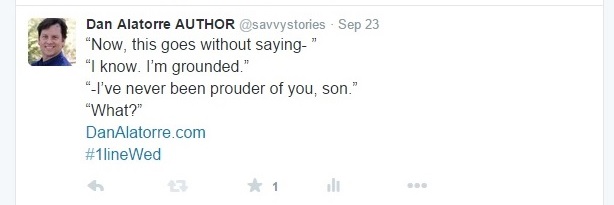
- Wednesday be sure to play the one line Wednesday #1lineWeds on Twitter. Use stuff from your writing and try to get their hashtag and your website into your tweet so you have something that draws interested parties back to your blog.
.
- On Saturday (I think it’s Saturday) there’s a blog rerun and rehash. So you rerun your BEST blog posts – the ones that got the most likes or comments, or the ones you think are most helpful.
.
- Make sure you cheerfully thank anyone who comments on your blog. You may publish a blog on Monday but that doesn’t mean everybody reads it on Monday. You will see comments trickle in through the week. Be sure to reply to each one and be friendly when you do.

.
- If you can do a guest blog post, do it. Not every site allows them, but right now I am. You’ll get bigger exposure and draw readers to your site as well.
.
- On the days you’re not posting a blog, or whenever it best fits into your schedule, read other people’s blogs and comment on them. Each comment you make on someone else’s blog is a small advertisement for the content on your website.
.
- Use tags in your blog posts. I haven’t historically done a lot of that and I’m just starting to, but supposedly it’s a big deal for getting noticed by search engines. You need that.

.
Basically, that gives you base-building activities seven days a week by only blogging twice a week. Not bad!
There are more (there always are) but this is a good start. Get to it.
What are some tips YOU recommend?
.

REBLOG me! Or SHARE this post on Facebook and Twitter! See those little buttons down below? Put on your glasses. There they are. Click them. The FOLLOW button is now in the lower right hand corner.
Got a QUESTION? ASK IT! Hit the Contact Me button and I’ll see what I can do. (I have lots of smart friends.)
Dan Alatorre is the author of several bestsellers and the hilarious upcoming novel “Poggibonsi: an italian misadventure.” Check out his other works HERE.
 DAN ALATORRE
56 replies on “7 Ways To Improve Your Blog Presence & Grow Your Platform”
Here is my comment. I await my cheerful ‘thank you’ 😉
LikeLiked by 2 people
Anybody who can wear a hat and make it look that cool is always going to get a cheery THANK YOU!
LikeLike
Dan, you are so kind. My hat and I are most appreciative, I assure you 😀
LikeLiked by 1 person
Great advice!… You always make it sound so easy.
LikeLiked by 2 people
I guess it’s easier for some than others but with effort and practice we can all get there! Thanks for commenting!
LikeLike
Great tips, thanks for sharing!
LikeLiked by 2 people
Thanks! I’m glad you saw some value here.
LikeLike
Wasn’t aware of the 1line hashtag, thanks! Spied your Twitter handle too, so following. Why do I always feel like a stalker when I follow people on several platforms?
LikeLiked by 2 people
We LOVE it when our friends help us on several platforms! For example, I am a Critique Partner with a few people. So, to help support their efforts…
I follow their blogs,
I’m following them on Twitter,
if they have a book out I “Like” their Amazon page,
I am Facebook friends with them
if they have a Facebook author page, I Like and Follow it
as well as emailing with them when necessary
I follow their Pinterest site and
I follow them on Instagram
So that’s eight different stalker-ish ways to help and support my author friends. Cos we’re friends! We have all these platforms and we need friends on them, so we support each other.
Feel free to do that for me, too!
And while that sounds like a lot of stuff, I’d say 90% of the interaction takes place on Facebook, 5% on email, 5% on our critique site, and less than 1% on Twitter and the rest. That’s just a guess, depending on the friend. Some are more active on email and less on Facebook, or whatever.
But it all helps you have a presence for new fans to find you, and if something takes off like a Twitter post or something, they can help you keep it going.
LikeLiked by 1 person
Well, I only have 3 social sites, WordPress inc. I do have you on Critique Circle too, but as I’m just starting out with my book writing, I’ll admit I don’t login to that very often. Shared the ost on Twitter, but I think I’d struggle with 8 platforms – even with your tips in the post on how to save time!
LikeLiked by 1 person
I don’t spend that much time on social media, but when you are learning a new one, it definitely takes time. After a week or two, you’ll find you spend a lot less time on it (if you want).
I spend about fifteen minutes on Twitter most days, if that. I do about ten minutes in the morning and maybe five minutes in the evening, but if I remember, check in during the day like at a traffic light or at lunch. Usually I don’t remember.
I spend 2 minutes on Instagram when I remember there’s a thing called Instagram.
I NEVER do anything on Pinterest, except once or twice a month for maybe five minutes.
I do nothing on my Amazon author page after I set it up except occasional maintenance, which may be four times a year.
I like Facebook so I check it a lot, but I don’t post as much as I used to. I’m mainly there to BS with author friends, and really just a few of those (mainly one).
Personal Email is maybe ten minutes a few times a day.
I don’t make it super easy to log in and check stuff cos I don’t wanna be looking at it all the time. And I have NO alerts set for ANY social media on my phone. I find out there are comments here when I log in; others have an alert go off on their phone. That would drag me in to look at the site and then I’d be looking at a bunch of stuff or commenting when I need to be doing other things.
It take a little discipline at first but once you have the habit, it’s easy.
LikeLiked by 1 person
Maybe turning alerts off is the way to go. But I can’t deny I like seeing instant validation of something I’ve posted – such the shallow creature that I am 😉
LikeLiked by 1 person
I’d have probably gotten totally hooked on that if I had set mine up that way, but I didn’t know how.
LikeLiked by 1 person
I have a friend who gets all the alerts immediately and I actually avoid posting to her sometimes because I know she’s at work or at church and don’t want to bother her. I feel like starting the message with DON’T READ THIS NOW! I have some silly question and it’s not the end of the word if she takes 4 hours to tell me or waits until she gets home. On the other hand, knowing she sees it all right away and doesn’t reply bugs me. I’m like, why isn’t she replying! I know she got the message! GIVE ME MY ANSWER!!
LikeLike
Great ideas! Thanks for sharing. 🙂
LikeLiked by 2 people
Thanks, Tonya! Glad you found it useful. (BTW folks, if you want a nice change of pace, go to Farmgirl’s blog. You can smell the fresh air just clicking on the site. It’s awesome.)
LikeLiked by 1 person
Thank you, Dan. It’s so kind of you to mention my blog!
LikeLiked by 1 person
It’s awesome, so refreshing. I love it.
LikeLiked by 1 person
That’s really nice to hear! Thanks so much. 🙂
LikeLiked by 1 person
Yes, I found your advice helpful! And also very uplifting – youw manner of writing is very attractive! 😀 I am also still learning about such stuff like hashtags and just tags in blogposts.
LikeLiked by 2 people
I was told to use tags a long time ago and I never really paid attention. Now I try to use them on every post, There’s a space on the left side of the screen when I’m in edit/compose mode in WordPress that says Tags or Add a Tag. That’s to help search engines like Google find you/your blog, so for example when you talk about Collies, you use a tag of Collies, and when somebody wants to know about Collies they type that i and supposedly the helps the search engine find your blog faster.
I use about eight or ten tags in a post. They are visible just under the Title of the post, and the tags for this are “advice, better writing, blogging, boosting traffic, instructional, motivation, self help, sell books, success, writing.”
They’re broad categories. I suppose if I was more specific it would be better. Still learning that part.
Glad you’re finding the site useful!
LikeLiked by 1 person
Tip 8: make sure your template is mobile friendly (yours is). Probably half of the blog posts I try to read aren’t, and I bail bc I can’t read .3 font and don’t feel like zooming in and swiping around to read it.
LikeLiked by 2 people
Allison, how does somebody know?
I know this blog looks a little different on my phone versus my lap top, but how it appears on other devices, I wouldn’t know. Is there way away to check? How awful to have people bail on your blog and you don’t know why, but it’s because of the way it appears.
That’s a good one. Thanks!
LikeLike
I can’t speak for non-WP blogs, but in the Admin panel, under Appearance, there’s a Mobile link at the bottom. When I click it, it says my theme is already deemed to be mobile-friendly. But there’s an option to enable mobile theme there, if one doesn’t see that message.
LikeLiked by 1 person
What smart people we have on here. Thanks!
LikeLiked by 1 person
Thanks for sharing such great tips! I find those tips super useful.
LikeLiked by 1 person
Thanks, Kally! That makes me happy to hear that.
LikeLiked by 1 person
Glad to know you Dan and thanks for this excellent article.
LikeLiked by 1 person
My pleasure. Glad you found some useful stuff in there. Thanks!
LikeLike
Another tip with WordPress.com blogs is that you can set it to export all your posts automatically to Google+. I don[‘t know anybody who actually uses Google+ as social media, which is kind of a shame, because I like the way it’s set up, but everything counts for Google search engines, which is something your really want. And once it’s set up, you never have to think about it again. On my blog, it’s done through the sharing menu off WP Admin. 🙂
LikeLiked by 1 person
Whaaaaaaaaaattt??? That would be awesome! How do I do that?
It could only help search engines find you…
LikeLike
I have mine to automatically post to my G+ account, and I agree, G+ is a great site, just doesn’t have the same draw that Facebook does. But with Facebook’s algorithm that hides stuff from other people, I rarely have hits above 5 on anything I post to my page (which has over a hundred followers).
LikeLiked by 1 person
Todd, would you do a How-To guest post that walks us through automatically posting our WordPress blog posts onto our Google+ accounts?
Anyone with a Gmail account has Google Plus, and if they ever had a YouTube account, it’s all one.
Considering Google is the largest search engine, it makes sense to have your blog posts go there. It will help writers be discovered by people searching for their topics.
Yes? Please?
LikeLiked by 1 person
I can put some work into it. Give me a few days, just because I’m in college full time and my work schedule. But, yeah, I can do that. (it’s actually quite simple).
LikeLike
Sounds good. Let me know when it’s ready and we can have you as a guest blogger! Thanks!
LikeLiked by 1 person
Roger that.
LikeLiked by 1 person
Thanks! Keep me posted. It’s awesome you’re doing this. Such smart, helpful people we have here!
LikeLiked by 1 person
Reblogged this on Anita & Jaye Dawes and commented:
Ever helpful, Dan…
LikeLiked by 1 person
Glad you liked it!
LikeLike
Good post. The tags thing, I would be curious about stats as to how that might help a blog get noticed. I mean, other than someone searching for images to pilfer.. I mean, copy.
LikeLiked by 1 person
I don’t know how, I just know it’s supposed to help. One way might be from the crawlers.They’d see it at the top of a post.
LikeLiked by 1 person
Great tips, Dan! So much to learn…so little time!! 🙂 Have a great week!
LikeLiked by 1 person
Glad you liked it!
LikeLiked by 1 person
Reblogged this on The GUNDERSTONE review.
LikeLiked by 1 person
Thanks!
LikeLike
Reblogged this on Kim's Author Support Blog.
LikeLiked by 1 person
Thanks!
LikeLike
Found you via Kim’s author support page. Great blog and some useful tips from everyone who has commented too! Thanks. I’m still trying to find out more about blogging, as I’m really not sure how to best use my site. I will look at Google+. I try to add things there, but haven’t worked out if it is worth doing. Maybe I should look at it again.
I find that Twitter is an excellent way to meet authors and readers, but it is time consuming. I run a networking hour for creatives and there are many bloggers, writers, artists, book lovers and designers chatting there. Pop by if any of you want to promote your work there. It’s free. #creativebizhour is the hashtag.
I’m going to try two posts on my blog a week and see how it goes! Thanks for the advice. Much appreciated.
Reblogged on Lizzie’s blog page.
LikeLiked by 1 person
Kim definitely has an amazing blog. I learn so much there.
I’ve tried stuff that didn’t work and when I revisited it again later it did. It’s always worth a second look, especially if people are saying they get results there.
When do you do your creative hour, and can you delegate any of the work to others? Maybe that could help with the workload.
Keep us posted on your progress and be sure to ask questions if you need help. I can post them here to help others and we’ll get lots of input from other readers.
Thanks!
LikeLiked by 1 person
I agree about Kim. Both your blogs are wonderful and full of great ideas. I will look again at Google +.
#creativebizhour is every Monday evening 8-9pm (GMT) on Twitter. We have over 17.3 Million timeline views in 1 hour some weeks and have been trending. It’s such a busy hour, but a lot of fun! I do have help to run it. I’m joined by Kelly, who is a talented photographer and Maureen, who is a wonderful author and about to publish her first book.
If anyone wants to promote their books or blogs there, just add #creativebizhour to your tweets and replies to chat, during the hour. I always advise adding a book cover or a photo, as these tweets get the most RT’s. Then RT others using the # to support each others work and help reach new audiences. Join in!
LikeLiked by 1 person
So the rest of us have to convert from GMT to wherever we live…
LikeLike
Reblogged this on Lizzie Chantree and commented:
Great post about blogs from author Dan Alatorre, via Kim’s author support blog.
LikeLiked by 1 person
Thanks for sharing this with your readers! You’re the BEST!
LikeLiked by 1 person
These 7 ways are quite simple. I have been blogging since 2013 and have two websites. Just recently I have had a flurry of twitter followers, and it’s very satisfying. I must admit I don’t go on there much, but I think, having read this article, that it may be the way forward for me as I would like to get more followers to my websites. 🙂
LikeLiked by 1 person
You’d be surprised at what can happen when you follow good advice. Good luck! Let us know how it goes.
LikeLiked by 1 person
[…] author, published or not, should have a media platform. That helps you share your brand and writing with the world. Video is just one more way, and more […]
LikeLike