Last week, I talked a little about social media (HERE), and in the comments/replies, I mentioned
how I drive crazy amounts of traffic to my blog using my secret method on Twitter.
It’s not really a secret. If you follow me on Twitter (my handle is Dan Alatorre AUTHOR
@savvystories) you’d see me do it. Which is what I said last week.
But me being the guy I am, I also explained that knowing WHAT to do is maybe half the battle. You need a strategy. You need a plan. You need to know that a strategy and a plan are the same thing, probably. And you need to execute the plan – as in, you have to do it.
So, what do I do?
I go to the bottom of a blog post and click the Twitter button to post it to Twitter.
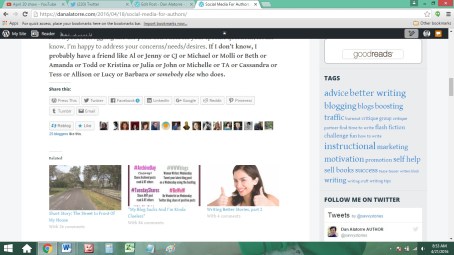

But instead of tweeting it, I copy the information – and not all of it, because I don’t need to waste characters pubbing WP, but just the part I need. Tweeting the WP link takes people right to the blog.
So far so good.
Then I add an author-ey type poster, or postcard, or picture, to catch people’s eyes. A meme, if I have one.
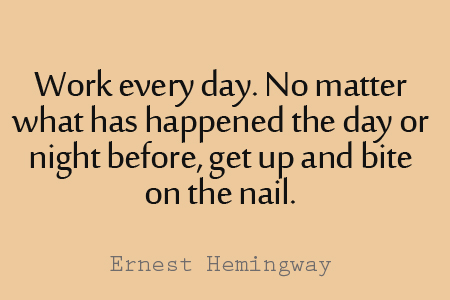
Then I write a few words that might be interesting (I hope) and stick them in the poster tweet, ahead of the info for the WP link. Like for that Hemingway quote, above, I might write “100% agree!” or say something snarky, but usually inspiring messages get the most retweets. So for this one I usually say what I’m working on. “Today the nail says edit!” Not super inspiring, but you get the idea.
Oh, and I just happen to have a LOT of these images stored away, so I can bang ’em out fast.

And HOW did I collect all those cool authorey images? Hey, I grab ’em whenever I see one I like. Facebook, Twitter, blogs – wherever. Right click and save, ready to go when I need one. Or I Google a famous author and to see what kind of writing quotes they’ve given, then click “images” and save them that way. Most well-known authors have said something interesting, so I Google authors I like or quotes I know.
The initial time investment to assemble a large author-oriented image collection was about an hour. Did it on a Sunday morning a while ago. Now I just add or replace an image whenever I see one I like. That takes a few seconds a few times a week. Easy peasy.
Now, coming up with a witty line to add onto it? Hey, that takes skill. Probably. It’s kinda like pancakes. The first few don’t really click, and sometimes NONE of them click, but usually after about five tweets I find the groove and get funny with it.
Usually.
Then I blast out ten or twenty of thirty tweets with this stuff, whatever I feel like doing. In a row, back to back. It’s better if I spread them out over the day but I’m human and I forget, but if it’s an important blog piece and I want good exposure I can usually pop in at breakfast, lunch and midday to send a few supplemental tweets.


Yep, that’s a lot.
Takes about 15 minutes.
Oh, and don’t forget to interact a little – as in, be social on social media – and if a few folks RT you, click over and say thanks. Stuff like that.

RTs drive your traffic to followers’ sites, where their friends and followers see it. Your traffic booms, so interact.
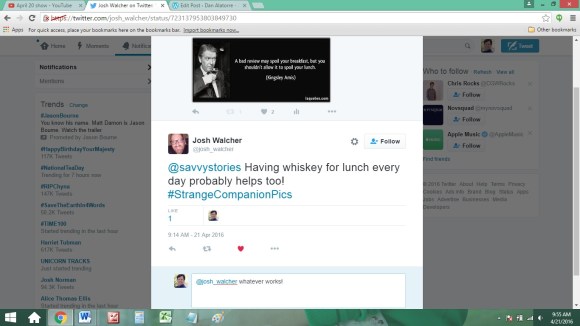
Maybe you’ll make a friend or gain a follower.
Now, I’m writing this a little in advance, so I hope to grab a screen shot of my stats and stick it HERE
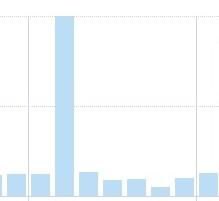
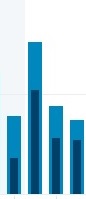
so we can see what a difference tweeting about your blog makes. I’ve done these examples before, showing how #1LineWeds (or other hashtags – click HERE, HERE and HERE for more on that and a list of helpful hashtags, too) can boost the hell out of your traffic. There are other ways. Experiment and have fun. Ask friends what they do. Share ideas here in the comments section, then see which appeal to you.
There are no wrong answers
but if you try a few things, odds are you’ll find one you connect with and enjoy – further enhancing your blog traffic and author platform.
This is one of the things I do. What do YOU do to boost YOUR blog traffic?

Want more great articles like this? SUBSCRIBE TO MY EMAIL LIST! Get a FREE copy of “25 Great eBook Marketing Tips You Wish You Knew,” FIRST SHOT at new stories, and exclusive behind the scenes access!
REBLOG me! And please SHARE this post on Facebook and Twitter! See those little buttons down below? Put on your glasses. There they are. Click them. The FOLLOW button is now in the lower right hand corner.
Dan Alatorre is the author of several bestsellers and the amazingly great upcoming sci fi action thriller “The Navigators.” Click HERE to check out his other works.
 DAN ALATORRE
19 replies on “Social Media For Authors, part 2”
Great suggestions! Sometimes I use phrases from the blog post I’m promoting above my images (along with the short link)…It saves me from thinking of something clever to say.
LikeLiked by 1 person
Anything to make less work for ourselves.
LikeLiked by 1 person
Reblogged this on Kim's Author Support Blog.
LikeLiked by 1 person
Thanks again!
LikeLiked by 1 person
Thanks for sharing this fun and very informative post Dan. You rock! 🙂
LikeLiked by 1 person
Sure, Deb! We aim to please.
LikeLiked by 1 person
You’re doing one heck of a job Dan. I’m sorry my visits and comments have been less than usual these past months, life can be challenging sometimes. Hoping to get back in gear in the next few weeks. 🙂
LikeLiked by 1 person
No worries. I know you’re busy. Glad you stop in and catch up.
LikeLiked by 1 person
Thanks, 🙂
LikeLiked by 1 person
[…] Source: Social Media For Authors, part 2 […]
LikeLiked by 1 person
Reblogged this on Don Massenzio's Blog and commented:
Here are some great tips for driving traffic to your blog from Twitter
LikeLiked by 1 person
Thanks!
LikeLiked by 1 person
This was great Dan, I am going to have to try this out soon.
LikeLiked by 2 people
Let us know how it works for you!
LikeLiked by 1 person
I will Dan, Thanks 🙂
LikeLiked by 1 person
Fun! I wandered over from Edwina’s Episodes – so glad I did even though I’m no Tweeter – it’s great to know how it all works. 🙂
LikeLiked by 1 person
Welcome aboard! Glad to have you here.
LikeLike
[…] LinkedIn, Instagram, BookBub, etc. Post the link to your show in each of these places and any other social media you use. It only takes a few minutes but it will be there working for you forever, so it’s well […]
LikeLike
[…] read more about stuff you can do to market your book, click HERE, HERE, HERE, HERE, or download my marketing book […]
LikeLike